
Listen first
Preview a track, move through it and check its audio information before exporting.
 DESKTOP & MOBILE APP
Play, convert and extract.
Your audio stays on your device.
Everyday audio formats, supported WEM files and embedded BNK streams, in one local app.
Free to install · Optional in-app purchases
Need a hand? Read the guide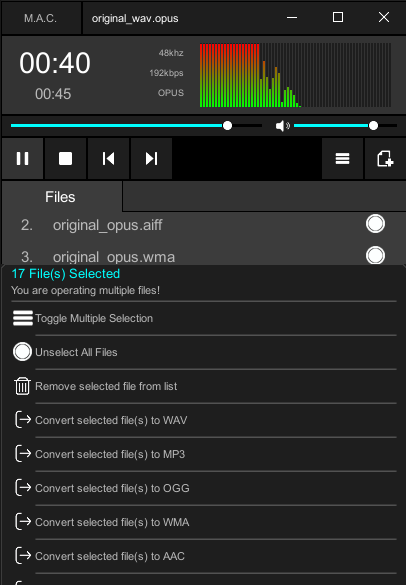
Preview a track, move through it and check its audio information before exporting.
Convert common audio formats for the player, editor or workflow you use next.
Play supported WEM audio and extract embedded streams from BNK banks.
Start with everyday audio, or work with supported game-audio profiles.
Import, preview and export common formats. Available codecs and options depend on the app edition.
Decode supported WEM audio, extract embedded BNK streams, and use compatible reference files for supported WEM exports.
Check WEM & BNK supportSelect files in the installed app and preview what you need.
Open the file actions and select a supported format.
Choose a destination and check the exported audio.
Install from your platform's official store.
Audio playback, conversion and batch actions on your PC.
Open Microsoft Store (opens in a new tab)Windows privacyPlay and convert audio files on your Android device.
Open Google Play (opens in a new tab)Android privacyPlay and convert local audio with the updated player. Requires iOS or iPadOS 15 or later.
Open App Store (opens in a new tab)iPhone & iPad privacyPlay, inspect and batch convert audio with the desktop player. See the store for system requirements.
Open Mac App Store (opens in a new tab)Mac privacyCheck each store for system requirements, regional availability and local prices. Features and purchase options vary by platform.
The app is free to install. On Windows, a single-file export is free, and batch exports can require a consumable purchase. On Android, some formats and batch actions offer an ad or a purchase, while larger batches can require a purchase. On iPhone, iPad and Mac, some exports require a consumable App Store purchase. Eligible iPhone and iPad exports may offer a rewarded ad. Check your store for current local prices.
Audio playback, decoding and conversion run on your device. The website offers product information and links to official stores. The platform privacy policy explains store purchases and advertising where offered. Read the platform privacy policy.
WEM is a container used for different audio codecs. Support depends on the codec and the app edition; the .wem extension alone does not identify a supported profile. Check that the file is complete and try a known-good file. Include the format or codec and the exact error in a support request.